Overview
Burrow is a self-hosted data ingestion pipeline and retrieval API that streamlines and accelerates the development of Retrieval-Augmented Generation (RAG) applications. It transforms organizational knowledge into semantically searchable context, allowing large language models to generate accurate, grounded responses using information relevant to each user prompt.
For many organizations, knowledge lives scattered across unstructured formats such as PDFs, wiki pages, meeting transcripts, and scanned documents. Preparing documents for RAG entails a complex sequence of transformations: raw files must be parsed, chunked, embedded, and indexed to enable semantic search.
As knowledge bases and RAG applications grow, automating this ingestion process is necessary to ensure that LLM responses continue to be grounded in up-to-date context. Building and maintaining production RAG pipelines, however, requires significant engineering investment. Developers are tasked with creating a system that handles a wide array of complex document formats, supports multiple retrieval strategies for different use cases, scales with demand, and integrates into existing organizational structures and workflows.
Burrow alleviates this operational burden by automating document ingestion end to end, while including advanced functionality for robust document parsing and high‑quality retrieval required by modern RAG applications. Deployed as a serverless, event‑driven system within a user's AWS environment, Burrow supports production workloads while keeping data private. A management UI and production‑ready APIs make integration straightforward, freeing teams to focus on building and refining their AI applications.
Background
Why RAG Matters
Innovation in hardware, transformer architecture, and machine learning over the last decade has produced a new class of powerful artificial intelligence: large language models (LLMs). Trained on text from billions of books, documents, and articles, these models develop broad predictive capabilities and are now deployed for knowledge-intensive tasks such as content writing, research, and customer support across a wide range of domains.
Despite their capabilities, LLMs have a fundamental limitation: they generate responses based only on their training data. Their ability to reference facts, statistics, and events is frozen in time. Without access to concrete, up-to-date information, they may confidently produce incorrect answers - an unwelcome phenomenon known as hallucination.
While hallucinations may be harmless in casual usage, they pose a serious risk in settings like law or healthcare, where accuracy is critical. The risk of hallucination is why RAG has emerged alongside LLMs as a fundamental technique for building modern AI applications. RAG provides LLMs with current, proprietary, or domain-specific knowledge they did not encounter during training and grounds their output in trusted sources of truth.
Retrieval With Semantic Search
RAG typically relies on an information retrieval technique called vector search to compare a user prompt with document chunks. Both are transformed into vector embeddings—mathematical representations that capture meaning.
Embedding models trained on text will arrange words with similar meanings so that their vectors are close to each other in an embedding space. In the following three-dimensional example, the proximity of "Squirrel" and "Chipmunk" represents the model's understanding of their related meaning, while an unrelated term like "Piano" appears farther away.
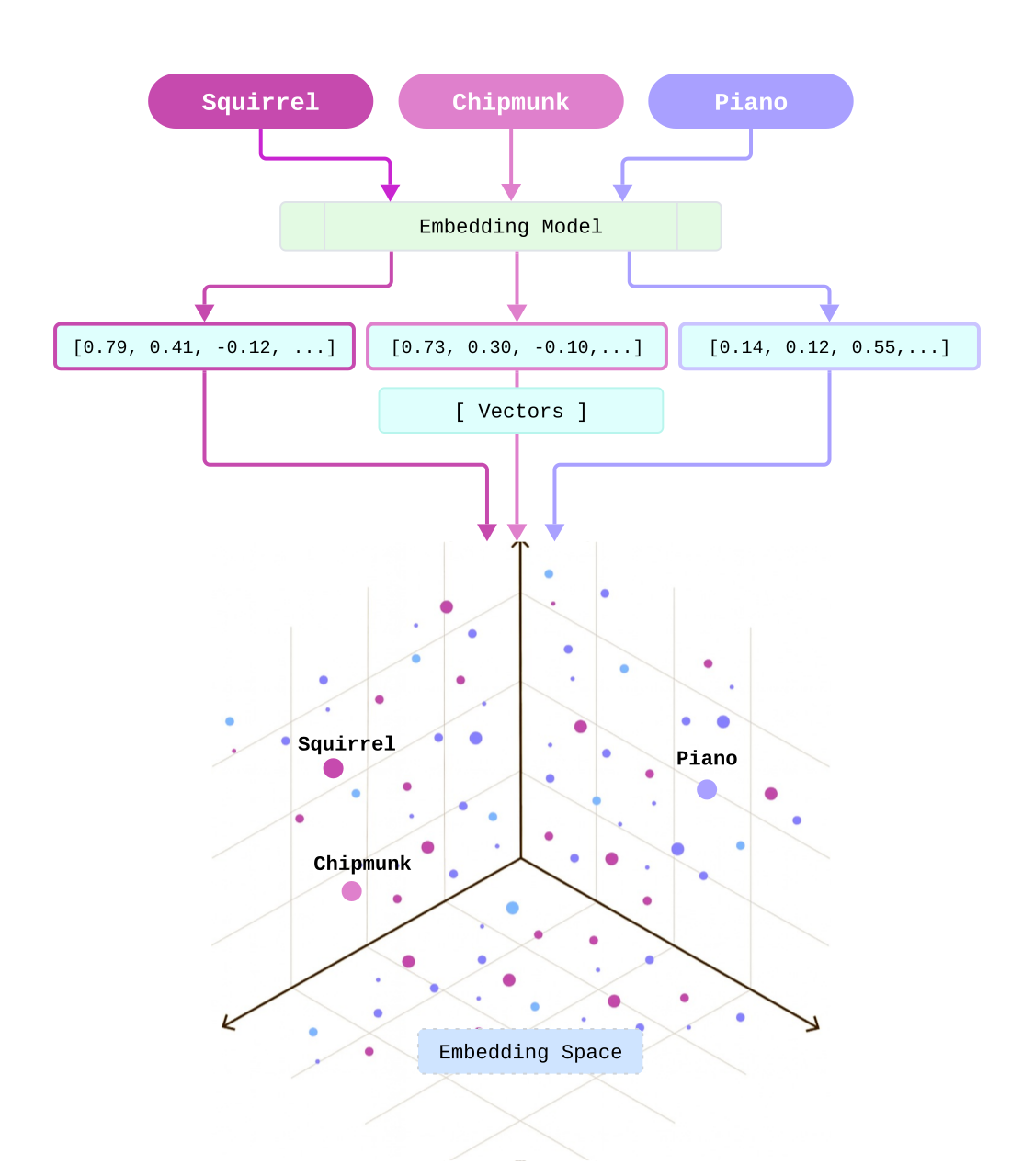
In RAG systems, algorithms perform these similarity comparisons at scale. This capability-semantic search-is what makes it possible to integrate LLMs with large, evolving knowledge bases. A traditional keyword-based query such as "travel expense policy" may return a broad set of documents based on literal matches. Semantic search, on the other hand, deciphers the intent of a natural language question like "Can I expense dinner if I'm working late with a client?" and surfaces specific policy sections that help answer that question.
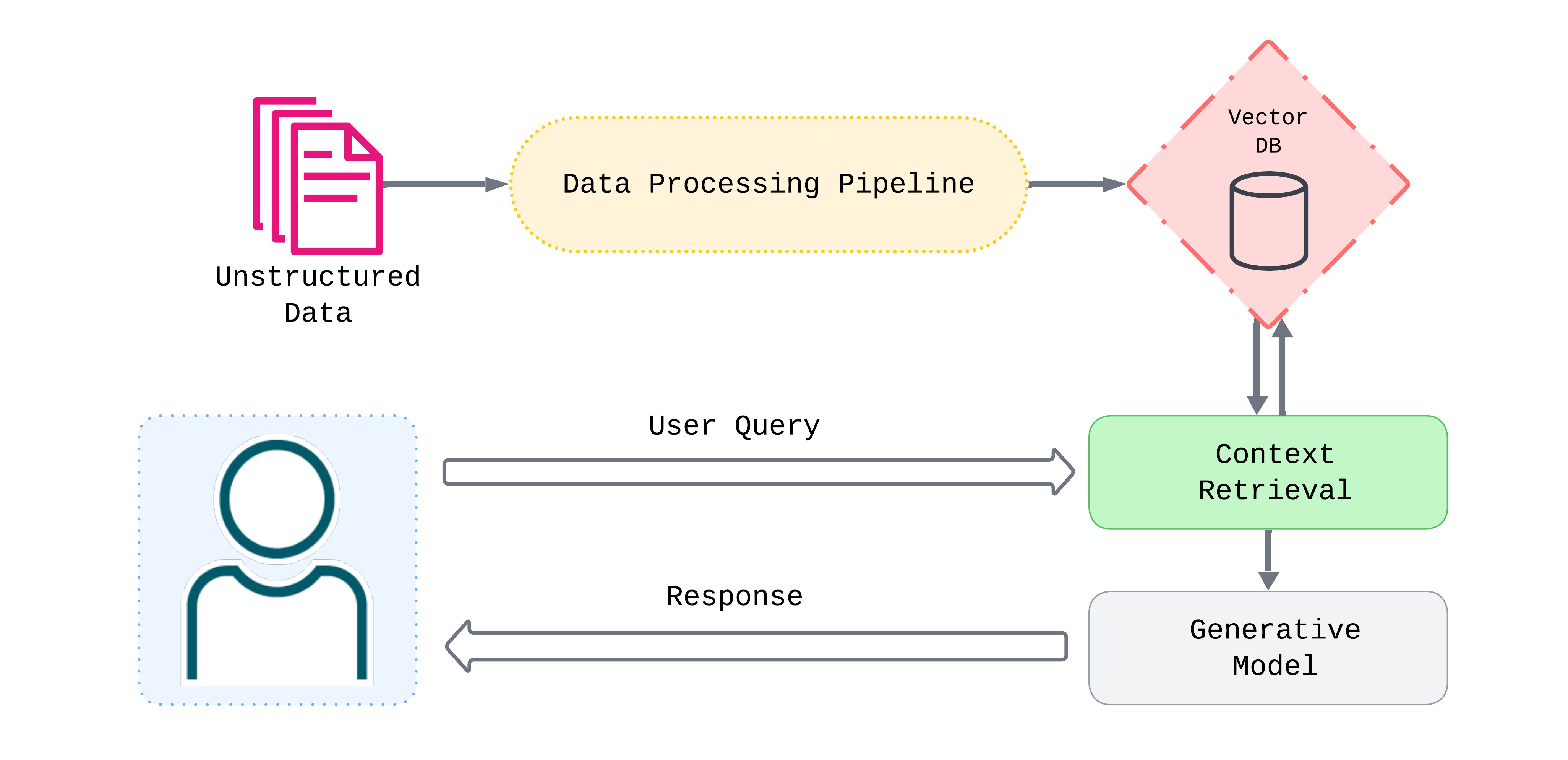
Semantic search fits into the full RAG workflow as follows:
- Indexing: An embedding model creates vectors for document chunks ahead of time and stores them in a vector database.
- Retrieval: When a query is submitted, the same model is used to create a vector embedding for comparison. Semantic search algorithms retrieve the document chunks most similar to the query.
- Augmentation: These chunks are combined with the user query and a system prompt that instructs the model how to use the retrieved context.
- Generation: The composed prompt is sent to an LLM which generates a response that has now been grounded in relevant context.
Preparing a Document for RAG
RAG relies on embedding document chunks and indexing them in a vector store ahead of time. But how do we get from raw files to searchable vectors?
Consider an employee training manual: a 20-page PDF covering company policies, benefits, onboarding, and common standard operating procedures. To make this document usable in a RAG system, it must pass through a sequence of transformations:
- Parsing: The raw file is converted into structured text, such as Markdown. If the manual contains infographics, optical character recognition (OCR) can be used to extract text; a table explaining employee benefits can be converted to a format that preserves its structure.
- Chunking: The text is split into segments small enough to fit within an LLM's context window while maintaining semantic coherence. Step-by-step onboarding instructions should remain intact; company policies sections should not be arbitrarily split.
- Embedding: Each chunk is transformed into a vector that captures its meaning, enabling similarity comparisons.
- Indexing: Vectors are stored in a database and organized with data structures optimized for fast similarity search.
For prototypes or modest knowledge bases that grow slowly, it might be feasible to process documents on an ad hoc basis using custom scripts and limited infrastructure. In practice, however, our training manual might live alongside HR policies, onboarding guides, and internal wikis—hundreds of documents that change over time. At this scale, automated ingestion pipelines become essential to ingest documents continuously, transform them reliably, and keep vector stores current.
Production RAG Pipelines
The core workflow of parse, chunk, embed, and index has by now become the foundation for RAG ingestion pipelines. It is, however, just a starting point - production RAG pipelines must build on this foundation to address real‑world constraints. Some of the most significant to take into account are:
- Complex document layouts
- Retrieval requirements beyond basic vector search
- Reliability and scale
- Organizational knowledge spread across many teams and systems.
Let's look at how production RAG pipelines can address each of these challenges.
Handling Complex Documents
A common approach to RAG pipelines is to address pipeline stages in isolation. This is especially true for chunking, where a common assumption in research and discussions seems to be that the input is clean markdown with clear headings and structured sections. In practice, however, most organizational knowledge lives in PDFs, spreadsheets or presentations, and comes formatted in a variety of complex layouts with tables, columns, and footnotes.
No chunking strategy can address columns that have been spliced or tables that have been compressed into meaningless streams of text. Traditional document parsers are often to blame for these parsing mishaps. They treat files such as PDFs as containers of text to be extracted into a uniform stream of characters. Multi-column layouts are read straight across from left to right, header hierarchies are flattened into plain text, and tables lose their row and column relationships. The result is a loss of the information defined implicitly by document structure and hierarchies.
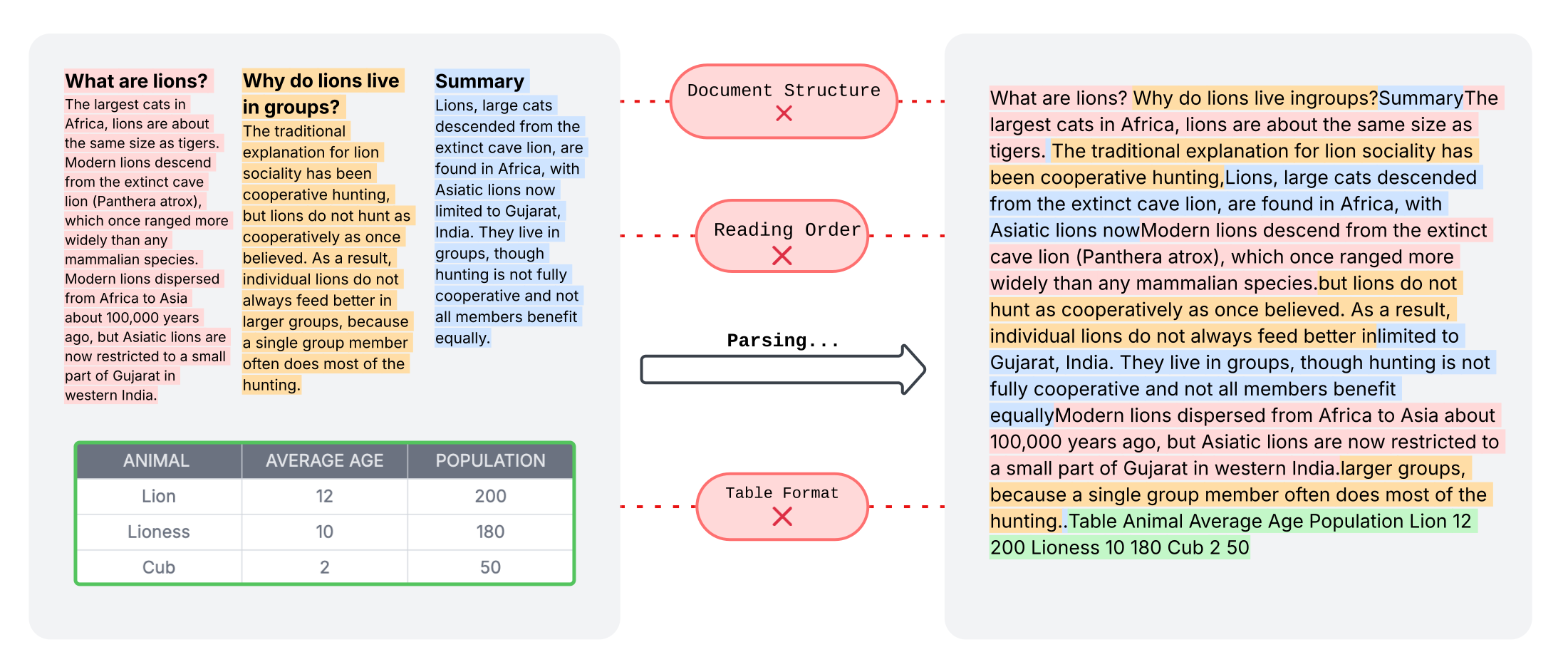
Production RAG pipelines address these challenges by using modern document parsers powered by computer vision models that understand document layout. These models detect structural elements such as headers, columns, and tables, and determine the correct reading order. This layout‑aware approach treats parsing and chunking as related concerns, enabling structure‑informed chunking and ensuring that valuable information is preserved from the very start of the pipeline.
Retrieval Beyond Vector Search
Vector search is a powerful foundation for semantic retrieval, but it has gaps that production systems must address.
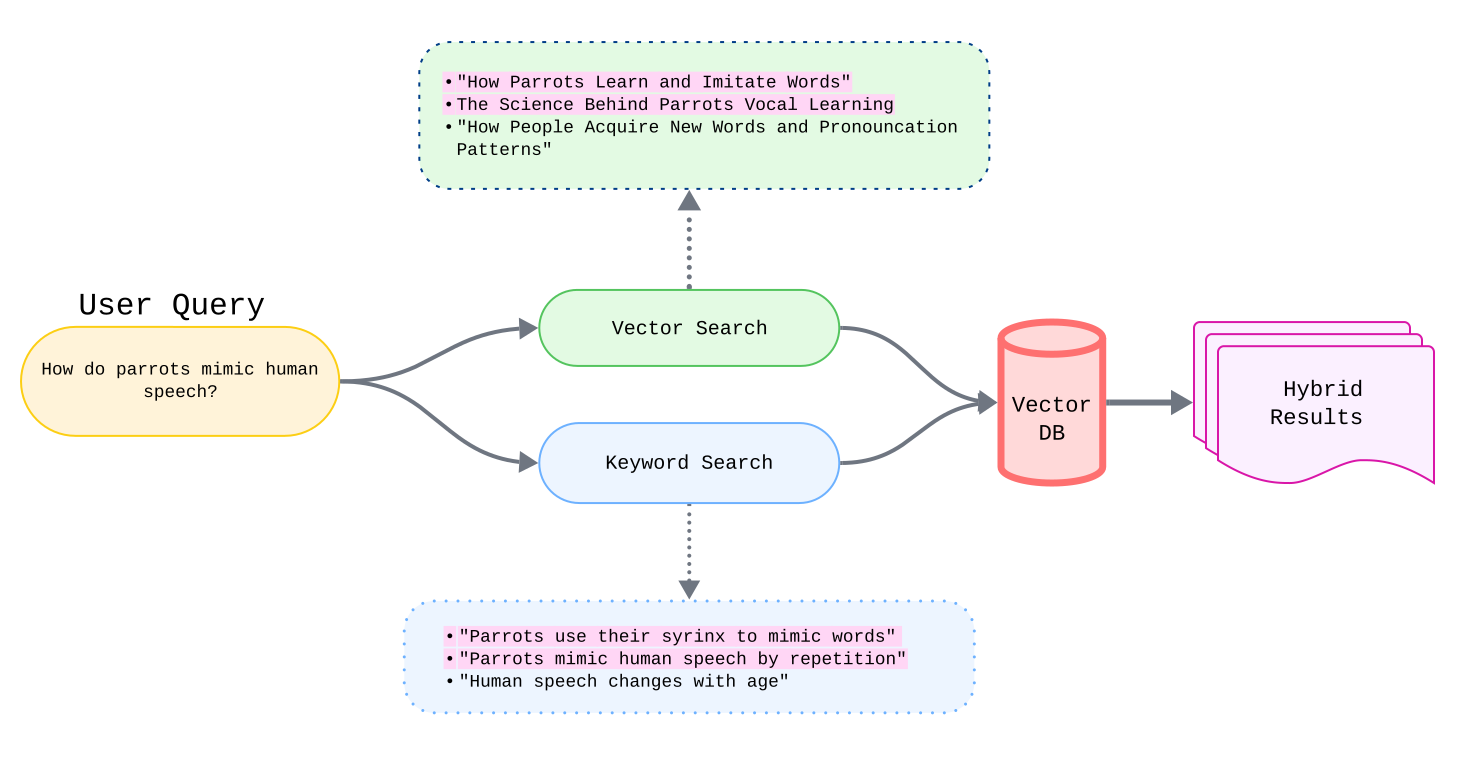
No exact match capability. Vector search can overlook documents containing specific terms in the query. A search for "error code 0x80070005" might return chunks discussing errors generally, but miss results mentioning that exact code.
A technique called hybrid search addresses this by performing vector and keyword search separately, then using a fusion algorithm to merge results. The algorithm rewards chunks that rank highly in both lists, leveraging each technique's strengths while minimizing its weaknesses.
Retrieval noise. The chunks most similar to a query may not be the most relevant for answering it. "What was quarterly revenue in 2024?" might retrieve ten chunks discussing revenue, with only one providing a direct answer.
A post-retrieval step called reranking addresses this gap. A specialized model re-scores candidate chunks based on relevance to the query, not just similarity. The output of the model is a relevance score, which is used to rerank the candidates and return the top results.
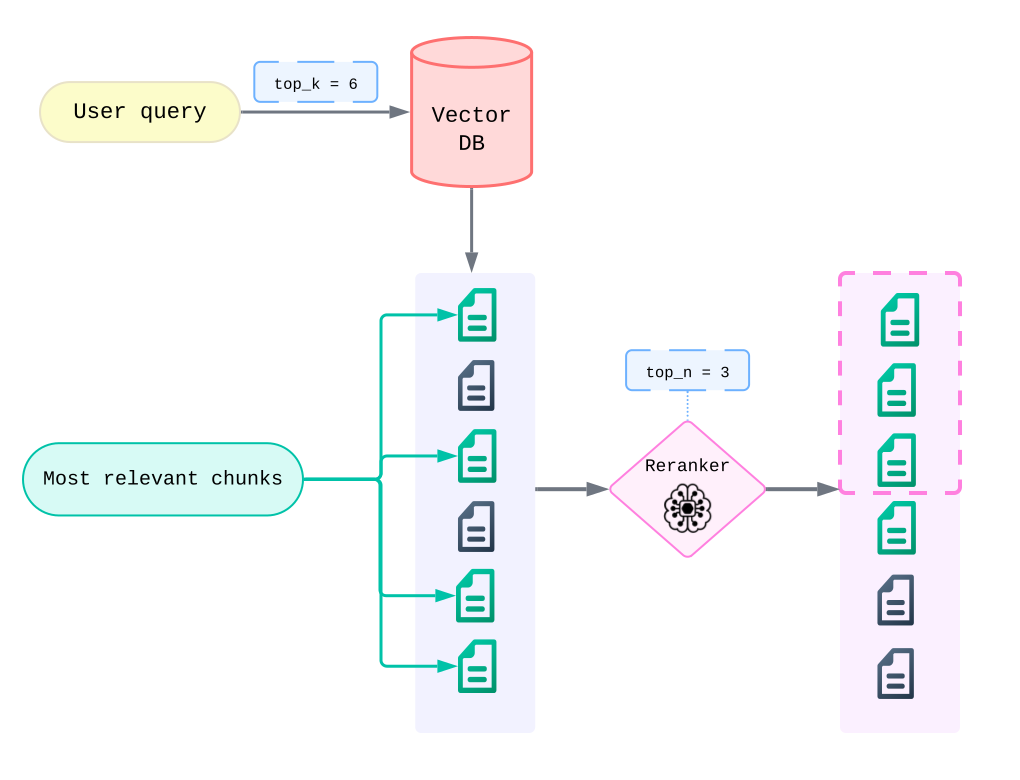
Lack of filtering. Users often need to scope retrieval by business logic that embeddings can't capture—specific document types, date ranges, or departments. Metadata filtering narrows the search space before retrieval, improving both relevance and performance.
These techniques can be combined for greater effect or used independently. As AI applications evolve, RAG pipelines need to support fine-tuned retrieval to optimize for different query types and use cases.
Reliability at Scale
Document ingestion has many moving parts—parsing, chunking, embedding, indexing—each with potential failure points. Production pipelines need visibility into progress so failures don't go unnoticed.
Scale compounds this complexity. Document ingestion patterns tend to be bursty: a law firm starting discovery might upload hundreds of documents in days, then nothing for weeks. Pipelines must handle both one-off uploads and sudden spikes without manual intervention—scaling up to process in parallel during peaks, scaling down to minimize costs when idle, and staying reliable throughout.
Pipeline Integration
A robust ingestion pipeline is only valuable if teams can actually use it. In many organizations, knowledge is distributed across groups: HR maintains onboarding materials, legal manages contracts, and engineering owns technical specifications. Each team controls a different portion of the organization’s knowledge base, which makes centralized ingestion and ongoing maintenance a coordination challenge.
For established workflows with predictable data sources, automation is essential. Programmatic access through APIs allows teams to script ingestion, integrate with existing systems, and keep documents up to date with minimal manual effort.
Not all data, however, enters a knowledge base predictably. Teams may need to ingest newly created or recently updated documents outside of scheduled workflows. In these scenarios, production systems benefit from usability features such as dashboards, multi-user access, and straightforward manual uploads.
Existing Solutions and Tradeoffs
DIY Pipelines
The considerations outlined above—document complexity, retrieval tuning, reliability at scale, and integration—highlight the scope and difficulty of building RAG pipelines.
Popular AI orchestration frameworks like LangChain and LlamaIndex help manage some of this complexity, providing abstractions for parsing, chunking, and retrieval. Even with these tools, however, teams are still responsible for assembling, operating, and maintaining the full system.
Beyond ingestion and retrieval logic, teams must also manage the infrastructure that runs the pipeline, whether on their own hardware or in the cloud. Managing compute, storage, and scaling over time adds operational complexity as ingestion volume and usage grow.
Managed Solutions
The complexity of building RAG pipelines is why a new product category of "RAG as a Service" has emerged. Managed solutions like Ragie and Vectorize offer:
- Proprietary vision models for layout-aware parsing and chunking
- Built-in hybrid search, reranking, and metadata filtering
- Managed, scalable cloud infrastructure
- Range of source and destination connectors
- Web-based GUIs for uploading documents and monitoring ingestion statuses
- APIs for integrating vector stores into RAG applications.
However, they come with their own tradeoffs:
- Data control: Documents leave internal systems and live in third-party vendor environments.
- Vendor lock-in: Architecture becomes dependent on proprietary platforms and models.
- Cost at scale: Per-document and per-query pricing can grow quickly with usage.
Given these limitations, we believe there exists a gap for open-source solutions that offer the convenience and scalability of managed services.
Introducing Burrow
What Makes Burrow Unique?
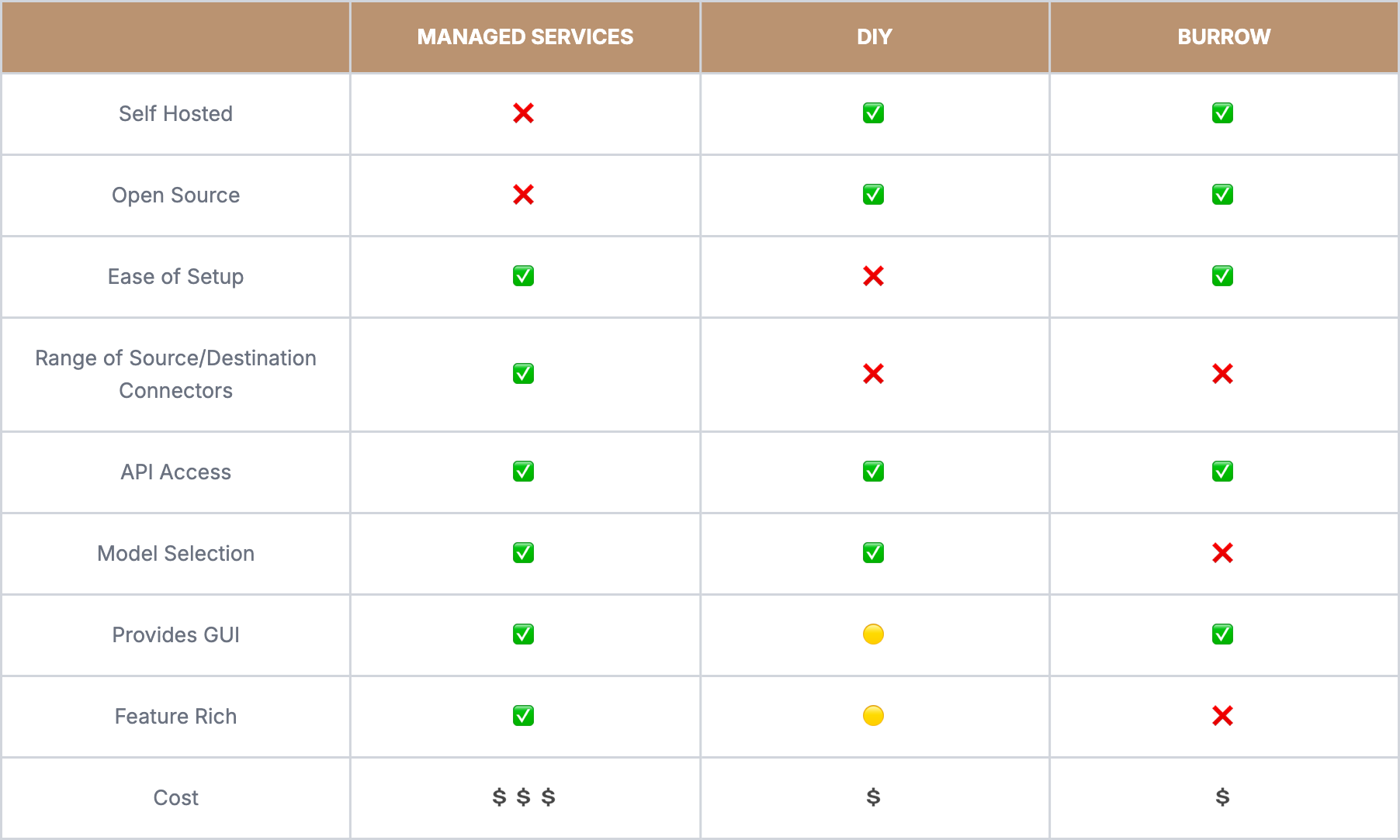
Burrow fills the gap between managed services and DIY approaches. It's not as feature-rich as Ragie or Vectorize, nor as customizable as a DIY pipeline, but by focusing on key areas, it delivers value for developers who want cost-effective, production-grade RAG in a scalable open-source solution.
In the landscape of RAG ETL pipelines, Burrow is built on a few core value propositions:
- Automation and integration: Burrow's pipeline automates the transformations that turn documents into a database of ready-to-query vectors and provides a web GUI and REST API so teams can unify scattered knowledge with minimal engineering effort.
- State-of-the-art document processing: Layout-aware parsing along with intelligent chunking that preserves document structure using the Docling library.
- Production-ready retrieval: A RAG API with toggleable parameters for hybrid search, reranking, and metadata filtering.
- Self-hosted serverless architecture: Automated deployment to your AWS environment. Performance and cost scale based on usage patterns.
Example Use Cases
Complex Training Materials
Organizations such as hotel groups manage a wide range of training content, including onboarding handbooks with multi‑column layouts, sales manuals with pricing tables, and brand guidelines with annotated images. These documents have complex structures that basic ingestion solutions struggle to parse.Secure Internal Knowledge
Employees frequently need to search across wikis, PDFs, and internal documents to find accurate information. Many organizations face a difficult tradeoff: relying on third‑party tools for sensitive data or investing significant time and effort to build an internal solution. Teams need fast access to knowledge without compromising security or data control.Bursty Ingestion Patterns
Many organizations experience sharp spikes in document ingestion. Consulting firms, for example, may upload hundreds of files at the start of a client engagement, followed by periods of intensive research and analysis. Fixed infrastructure either sits idle during quiet periods or struggles to keep up during peak demand.Across these scenarios, Burrow provides a strong fit: layout‑aware parsing handles complex documents, self‑hosted deployment keeps data within organizational boundaries, and an event‑driven architecture scales naturally with usage.
Walkthrough and Design
Pipeline Management
Burrow provides users with flexible options for ingesting files and managing the pipeline.
The pipeline dashboard is a convenient interface for uploading files, managing documents, and monitoring ingestion statuses. Hosted via CloudFront, it supports multiple users so teams can securely share pipeline access and connect scattered knowledge bases.
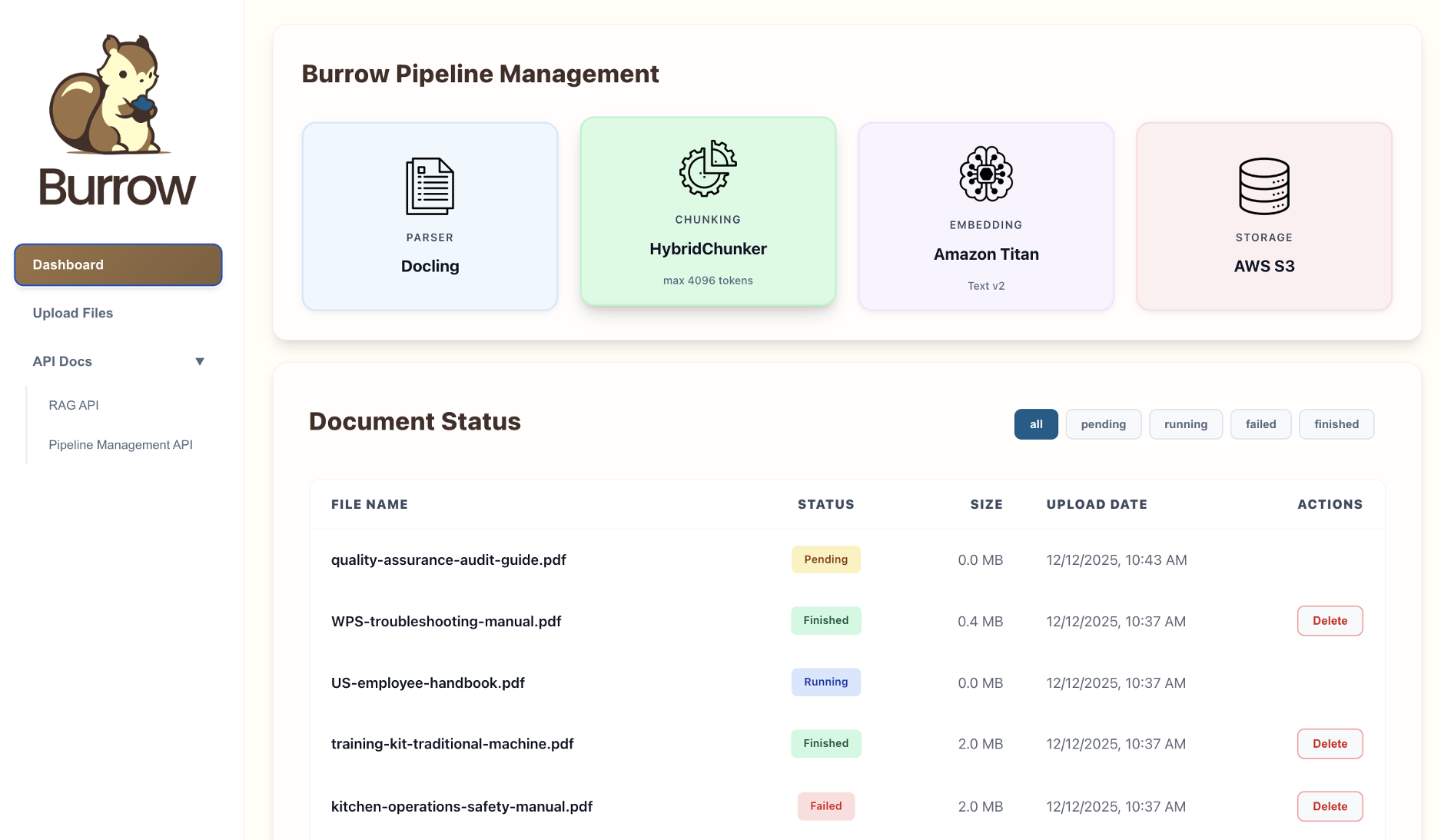
The dashboard's functionality is also available to users as a REST API, which enables users to write scripts and automate workflows as their knowledge bases scale. OpenAPI-based documentation is easily accessible in the management UI.
Together, the web UI and Pipeline API allow users to quickly integrate Burrow's pipeline with their knowledge bases and save time with automation as their applications evolve.
Ingestion Engine
Uploading a file kicks off the ingestion process by streaming the document to an S3 bucket. This event spins up a dedicated task to process the document. This "ingestion engine" is a self-contained, transient task that scales horizontally per upload. It orchestrates the transformations of parsing, chunking, embedding, and also persists vectors to a centralized database.
Why Docling
For our parsing solution, we landed on Docling as the strongest open-source option for advanced document parsing. In one benchmark study using complex PDF sustainability reports, it outperformed Unstructured and LlamaParse, two widely used document processing platforms for enterprise RAG. Its approach to chunking leverages the information preserved by its layout-aware parsing process.
How Docling Parses Documents
Docling was released by IBM in 2024 to meet growing demand for better document parsing in LLM pipelines. In addition to a state-of-the-art Optical Character Recognition (OCR) model, Docling comes with two advanced vision models.
- A layout vision model creates a map of document elements (text blocks, headers, tables). This map is then interpreted by an algorithm that determines the correct reading order and decides how to further parse each element.
- A table structure model interprets any tables found in the previous step and converts them into markdown format.
Once all text has been extracted from all elements using format-specific parsers, Docling assembles it in the correct order. Structured JSON is used to preserve key information about the document's hierarchical structure, such as filename, page numbers, and element types, as metadata.
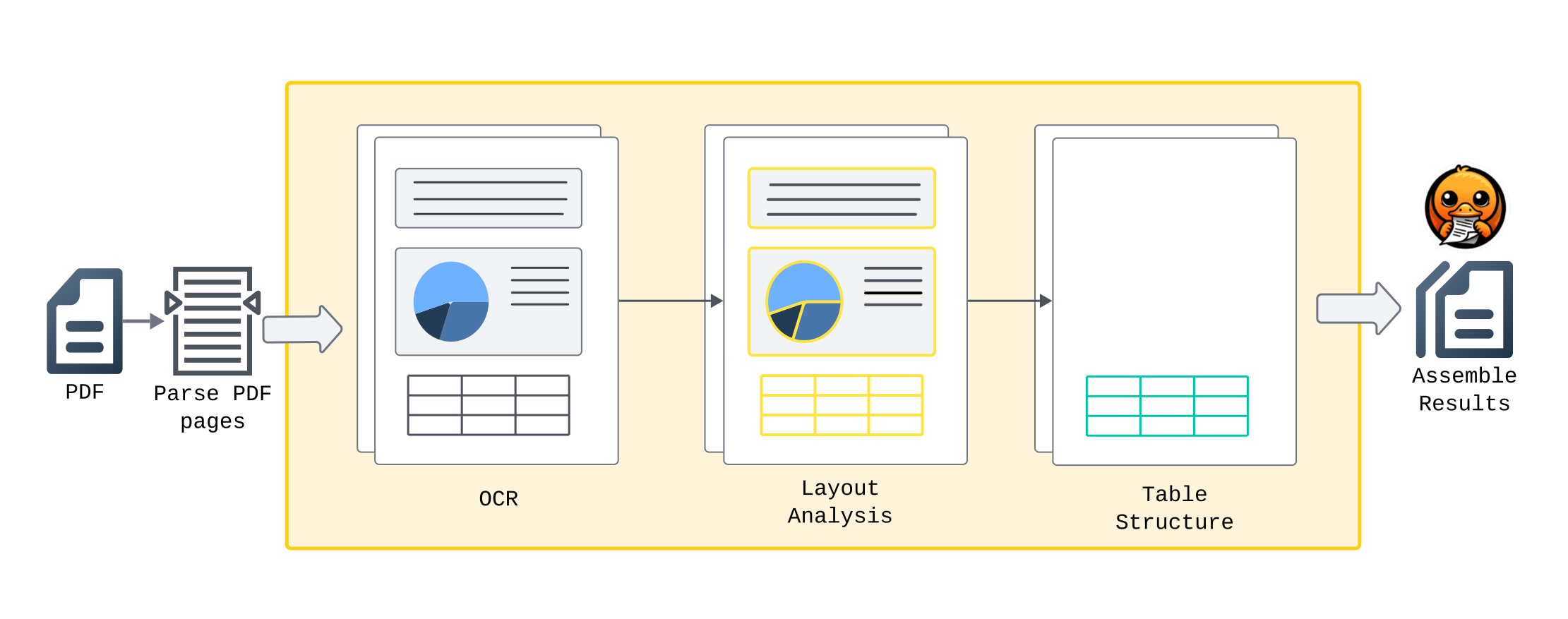
Docling's parsing workflow
HybridChunker
Docling includes a built‑in chunker that uses layout metadata to split documents into chunks while respecting structural boundaries. Chunk size is controlled by a token limit; we use 4,096 tokens by default to balance context size and embedding quality.
When a section exceeds the maximum chunk size, HybridChunker applies semantic splitting based on natural boundaries such as paragraph breaks, sentence terminators, and other meaningful separators to avoid mid‑sentence splits.
Chunks never cross section boundaries. Smaller adjacent sections are combined until they approach the token limit, maximizing usable context without losing structure.
This design reflects a key principle discussed earlier: chunking cannot compensate for poor parsing. Instead, chunking should leverage high‑quality parsing. By integrating directly with Docling’s layout analysis, HybridChunker produces chunks that preserve structural context and improve downstream retrieval.
Embedding
Finalized chunks are embedded with Titan Text Embeddings V2, an AWS embedding model optimized for RAG use cases. Because the model is available through Amazon Bedrock, embeddings can be generated without data leaving the user's AWS environment.
Vector Storage
The embedded chunks, along with their Docling metadata, are stored in a PostgreSQL database. The database is configured with indexes for metadata, keyword search, and vector similarity, enabling the retrieval options exposed by the RAG API.
At this stage, documents have completed their journey through the pipeline, and Burrow can deprovision ingestion resources to minimize ongoing costs.
Production-Ready RAG API
Once document chunks are centralized and indexed, they are ready for retrieval. Burrow exposes advanced retrieval techniques—hybrid search, reranking, and metadata filtering—directly through its API, without requiring teams to implement or operate these components themselves.
Teams building RAG systems from scratch must configure database indexes, integrate reranking models, and write custom retrieval logic. Burrow abstracts this complexity behind two endpoints:
- /retrieve: Retrieve raw text chunks similar to the query
- /query: Synthesizes query and text chunks, prompts an LLM, and returns its generated answer
Optional parameters allow developers to control retrieval behavior, enabling or tuning techniques such as hybrid search, reranking, and metadata filtering as needed:
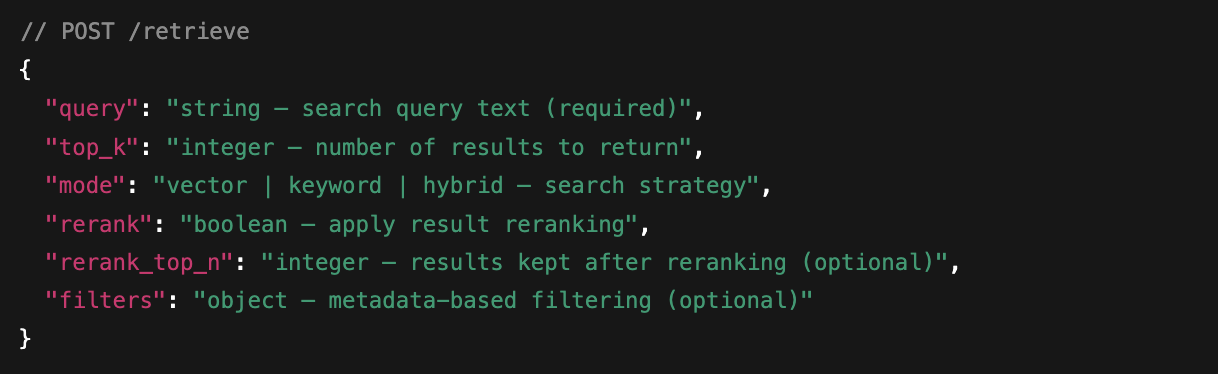
For more details, see the API documentation
These endpoints support a range of production use cases:
Developers can start with /query for rapid prototyping or simple integrations. They can switch to /retrieve for finer control, such as supplying custom system prompts, adjusting hybrid search weights, or experimenting with new retrieval strategies. Reranking can be enabled for accuracy‑critical queries and disabled when lower latency is preferred.
Together, Burrow’s ingestion pipeline and API provide a simple and predictable workflow. Documents are uploaded and monitored through the dashboard, while Burrow handles parsing, chunking, embedding, and indexing in the background. Newly ingested content becomes immediately available through the API, enabling fast, reliable updates to production RAG applications.
Building Burrow
High-Level Architecture
Burrow is built on AWS to take advantage of its mature serverless and event‑driven services, which are well suited to the variable and bursty nature of document ingestion workloads. Using managed AWS components allows Burrow to scale with demand, reduce operational overhead, and keep all data within a customer’s cloud environment.
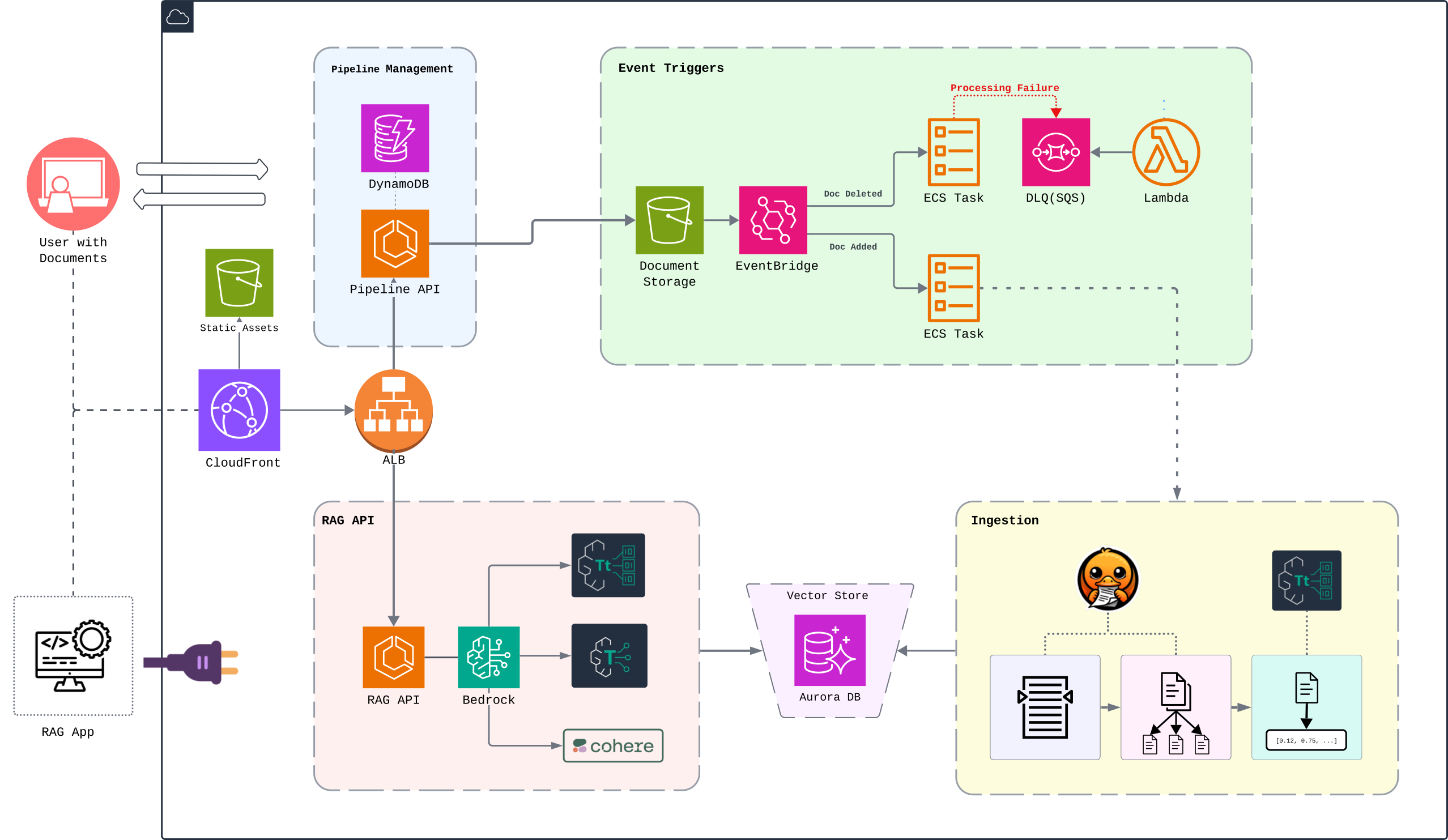
This diagram shows how Burrow’s core functions are implemented using AWS services.
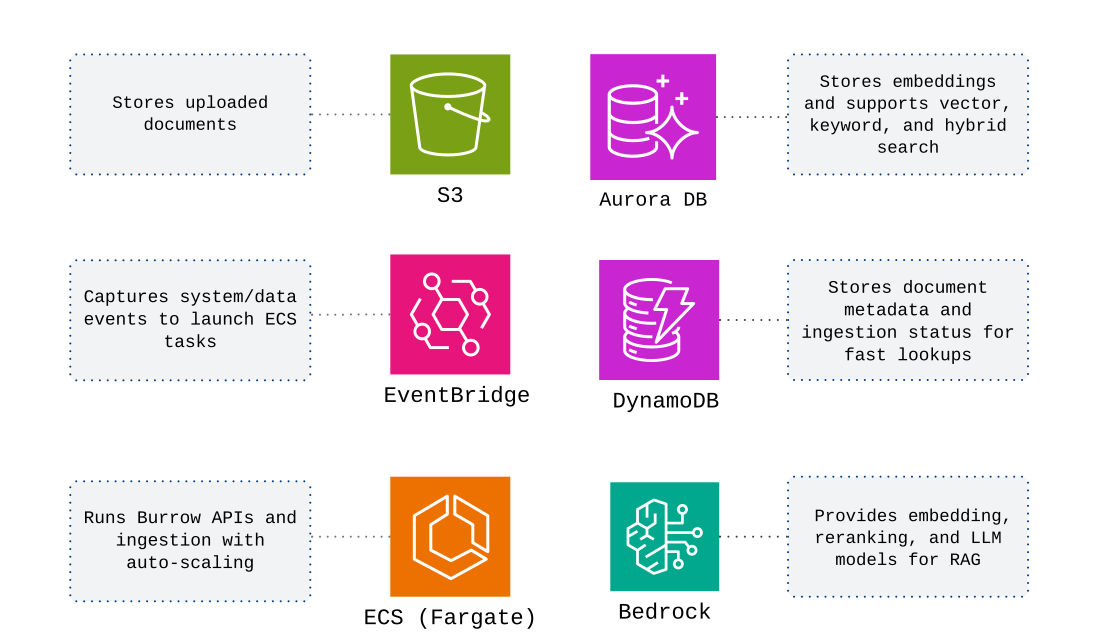
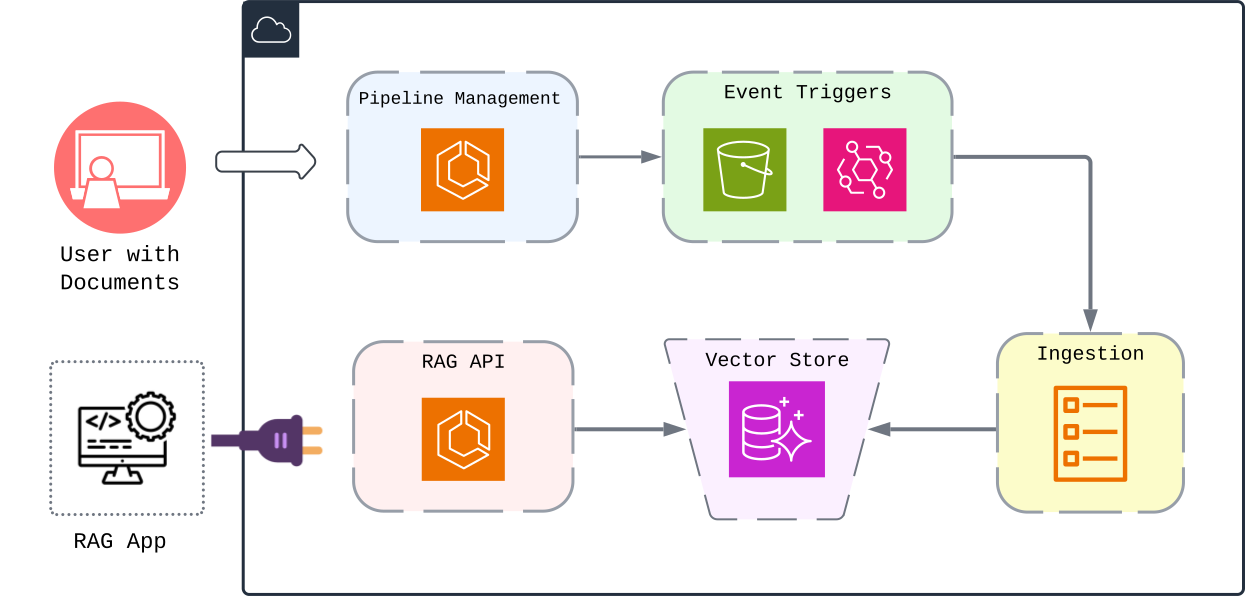
These services are then composed into five distinct subsystems that make up Burrow:
- Pipeline Management
- Event-driven Triggers
- Ingestion Task
- Vector Store
- RAG API
Pipeline Management
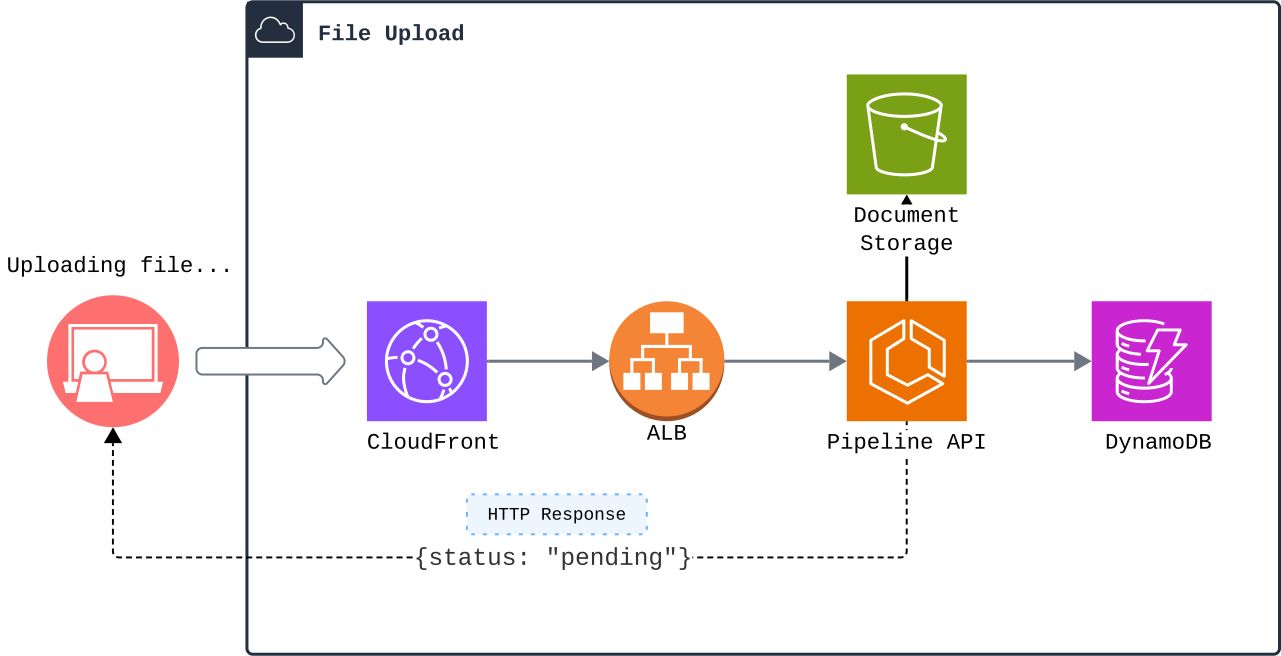
CloudFront functions as a secure entry point to Burrow's pipeline: it routes API traffic to the Application Load Balancer while serving the web UI as a single-page application. When a user uploads a file, the request is forwarded to the ALB, which then routes it to a healthy container in the Pipeline API's ECS service.
Clients authenticate via JSON Web Tokens (JWT) - a stateless approach that works for both browser users and automated scripts. This flexibility enables an API-first development approach that scales to support different client types–in Burrow's case, these were the management dashboard and pipeline API.
If the client is authenticated, the file is uploaded to S3 using the multer-s3 middleware for direct streaming, avoiding the overhead of buffering files in RAM or writing them to disk. Once the file is uploaded, the pipeline API creates a record of the document in DynamoDB with a status set to pending. This record and status are also sent back to the client. Subsequent status updates as documents advance through the pipeline trigger Server Sent Events (SSE) to notify clients of ingestion progress.
At this point, the file is in S3, and the client has been updated. What happens next is driven by events.
Event-Driven Triggers
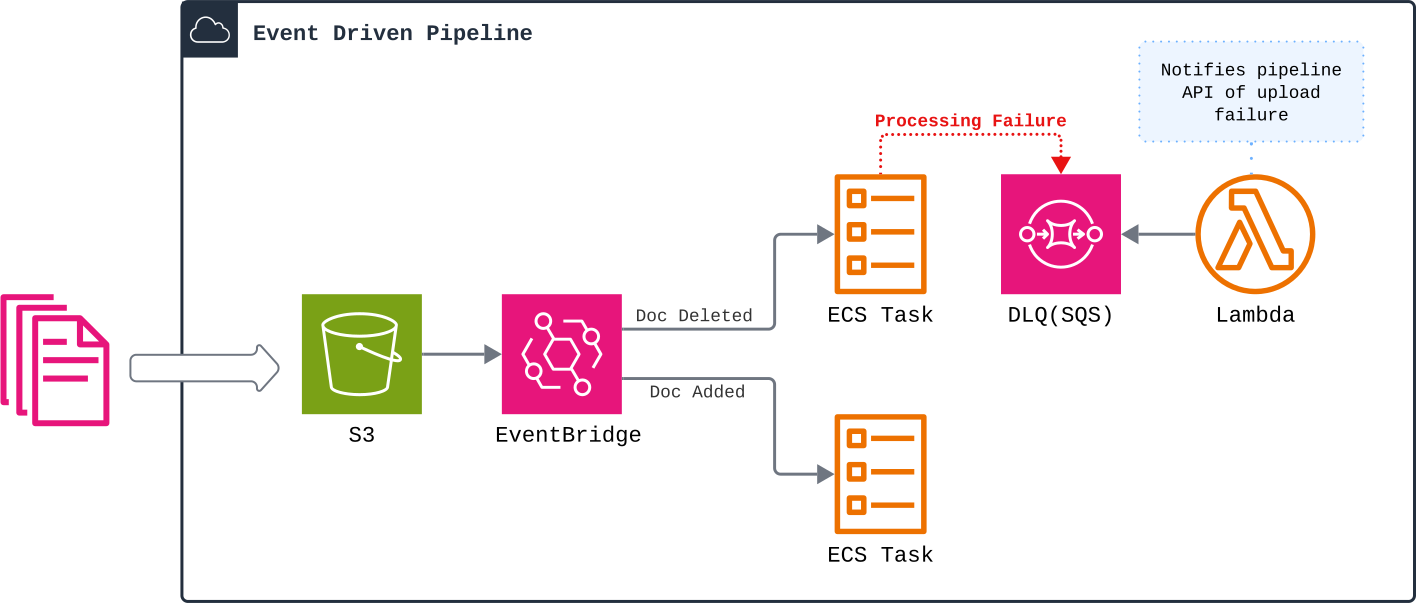
Using S3 for file storage lets us leverage EventBridge to build a robust, event-driven pipeline. EventBridge is a serverless solution that provides core components for developers to build event-driven architectures, while AWS automatically manages concerns such as error handling, retries, and scaling.
For our primary event - file uploads - EventBridge triggers an ECS Task using our ingestion task definition and passes it the document ID.
We also configured a dead-letter queue to handle event failures. These can result from event delivery issues (infrastructure failures) or errors during ECS task execution (application failures). A Lambda function processes the queue and updates document statuses to "failed", ensuring issues are visible and handled rather than silently dropped.
Ingestion Task
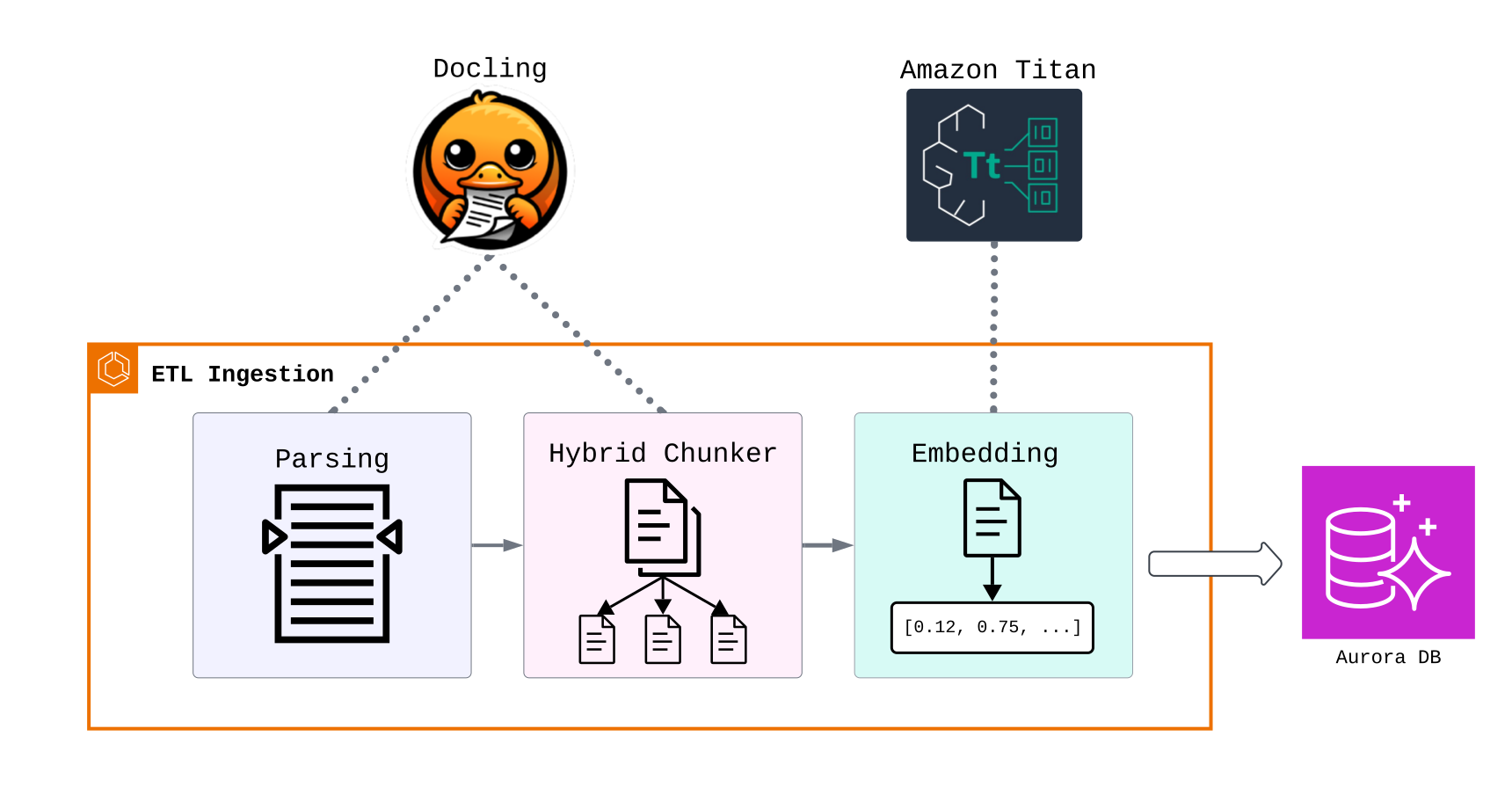
The Ingestion Task runs as an ECS task rather than a long-running service-we discuss this decision below in Engineering Challenges.
The ingestion task receives the ID of an uploaded document from EventBridge, which it uses to fetch the file from S3. Docling parses the document and chunks it with HybridChunker. Chunks are embedded by calling Bedrock's Titan Text Embeddings V2 model.
Once the finalized vector embeddings are written to the Aurora Serverless vector store, the ingestion task updates the document's status in DynamoDB to finished.
Vector Store
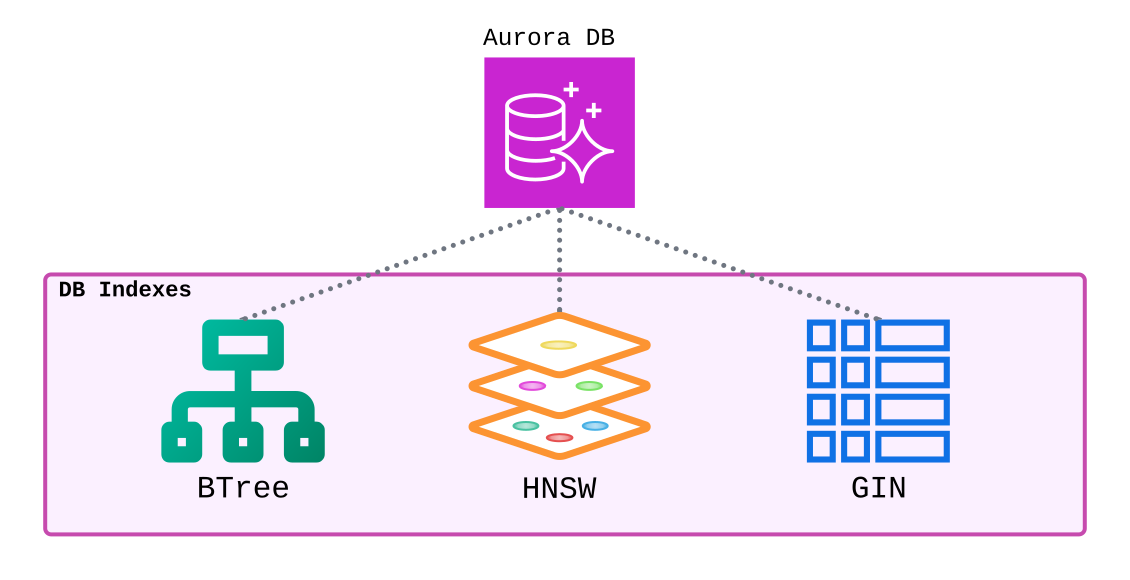
Burrow uses Aurora Serverless PostgreSQL with the pgvector extension as its vector store.
We configured three indices:
- Hierarchical Navigable Small World (HNSW), a specialized data structure used to efficiently calculate vector similarity with an approximate nearest neighbors (ANN) algorithm
- Generalized Inverted Index (GIN), an index optimized for efficient keyword and term-based search
- B-tree index for metadata filtering
Together, these enable vector, keyword, and hybrid search in addition to metadata filtering.
RAG API
The RAG API is an ECS service that handles all retrieval operations, separate from the Pipeline API due to their different scaling characteristics and resource dependencies.
Requests flow through CloudFront and are authenticated with the user's RAG API token.
Bedrock provides access to three models required by our API.
- Queries are embedded with Titan Text Embeddings V2 - the same model used during ingestion - and compared with Aurora to retrieve the most relevant chunks using similarity search.
- For requests with rerank set to true, the Cohere reranking model is called to re-score retrieved chunks for relevance at the cost of additional latency.
- Requests to /query synthesize the user query, retrieved chunks, and a system prompt. The result is submitted to Amazon Titan Text to generate a response.
Full Architecture
All five subsystems are shown in this diagram of Burrow's full architecture, illustrating the complete flow from upload to retrieval.
Engineering Tradeoffs and Challenges
Event-Driven Tasks vs Long-Running Service
During prototyping, we initially considered a long-running ECS service that would continuously wait for new documents. This approach simplifies development, testing, and maintenance.
The problem, however, is that document ingestion follows sporadic patterns. For some organizations, the typical daily workload might be a few documents uploaded throughout the day, each taking 2 minutes for ingestion. In this example, a 24/7 service would sit idle 99% of the time.
Instead, we shifted directly to an event-driven approach: S3 uploads trigger EventBridge, launching an ECS ingestion task that terminates upon completion. This allows horizontal scaling during bursts of heavy ingestion volume, while spinning down to zero for idle periods.
The trade-off is orchestration complexity: coordinating EventBridge rules, task definitions, container builds, and service-to-service communication requires more configuration than a monolithic ingestion service. The cost-savings angle, however, made this an easy decision: we estimate a 95%+ reduction in costs with this approach compared to always-on infrastructure.
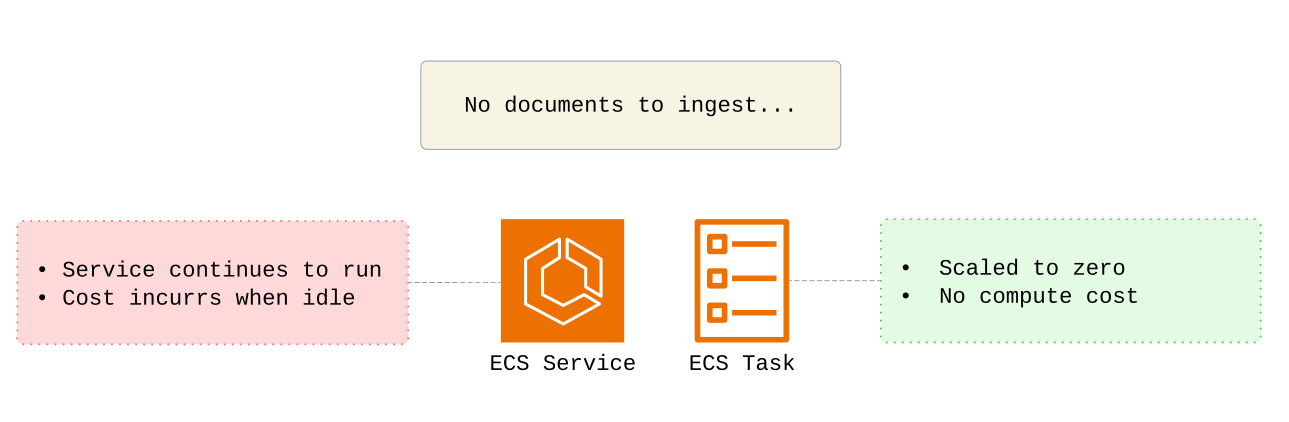
We also considered AWS Lambda as another serverless solution that is typically associated with event-driven architecture. For our use case, though, ECS tasks offer more flexibility. Lambda's 15-minute limit should be sufficient for most documents, but our ingestion task could potentially exceed that for very large files. ECS has no such limit–a characteristic that may be increasingly important if future updates incorporate heavier models or additional processing steps.
DynamoDB Access Patterns
Our MVP implemented a DynamoDB schema with documentId as the sole primary key for our document management table. As we iterated, however, it became clear that the management UI had different access patterns: frequently filtering documents by status and sorting by creation time. These queries would require inefficient table scans as data grew.
The solution was adding a Global Secondary Index (GSI) with status as the partition key and createdAt as the sort key. This GSI lets us use Query operations that scale with the number of matching items rather than the full table, ensuring fast, predictable reads for the UI.
The trade-off is that updates need to happen in both the base table and the GSI, resulting in slower writes. This is acceptable for our use case, given that document status queries are read-heavy in nature.
Coordinating Distributed State
Deleting a document from the pipeline requires synchronizing state in three different storage layers: the S3 bucket, DynamoDB, and PostgreSQL. Our approach to this challenge involved exploring failure modes that could lead to inconsistent states. For example, with our initial approach, a user deletion first removes the file from S3 and shows "deleting" in the UI, but something like an Eventbridge failure could prevent downstream vector deletion from running. That leaves orphaned vectors in PostgreSQL, so users could still retrieve results from a document they thought was deleted.
We wanted the system to notify the user if a document or its associated vectors failed to delete and allow retries. To achieve this, we used S3 resource tags to trigger a deletion workflow rather than optimistically deleting files. A tag-change event is routed to start an ECS ingestion task, which deletes vectors from PostgreSQL before notifying the pipeline API of success. The document is then moved to a "deleted" folder in S3 with a 90-day lifecycle policy, and a time to live (TTL) of 90 days is added to the document in DynamoDB.
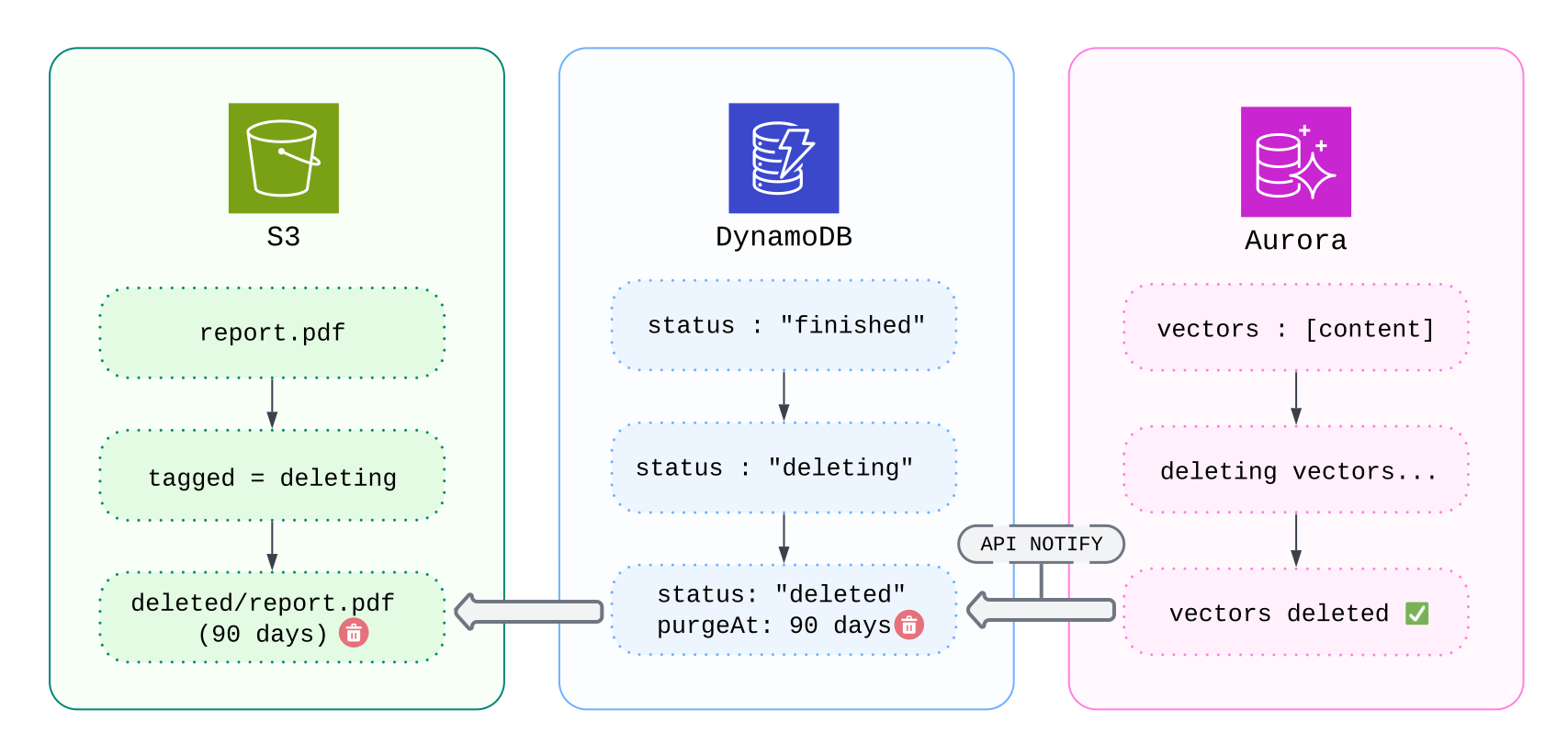
These steps facilitate data auditing, allowing engineers to keep tabs on what documents were deleted and investigate incidents where users report missing documents or unexpected search results. Failed deletions are tracked and can be retried, while successful deletions follow a clear audit trail from "deleting" to "deleted" status.
Handling Failures Gracefully
During early testing, we noticed that some ingestion task failures left document statuses stuck in "pending" indefinitely.
We needed to catch two types of failures that our Pipeline API couldn't detect: infrastructure failures, where the task fails to start, and application failures, where the task crashes.
The solution was implementing a Dead Letter Queue with Simple Queue Service that captures:
- Failed EventBridge events
- ECS tasks that exit with non-zero codes.
A Lambda function processes the Dead Letter Queue and notifies the Pipeline API, which updates the status to "failed".
One additional obstacle was that our ALB security group only allows traffic from CloudFront and a NAT Gateway IP. For our Lambda to access the Pipeline API, it had to be deployed inside a virtual private cloud (VPC) and routed through the NAT gateway. This takes an additional 2-5 seconds, but the cold start time is acceptable for infrequent error handling.
The result is that no failures go unnoticed, and the user receives clear feedback.
Aurora Serverless + pgvector vs Dedicated Vector Stores
We evaluated three options for vector storage:
- Pinecone
- Amazon OpenSearch Serverless
- Aurora Serverless PostgreSQL with pgvector extension
Pinecone is a popular dedicated vector database with strong performance and advanced features. However, as a fully managed external service, it requires moving data outside a customer’s AWS environment, which conflicts with Burrow’s emphasis on data sovereignty. For this reason, Pinecone was ruled out early.
OpenSearch Serverless is an AWS offering with excellent performance and scalability, supporting low-latency queries for very large embedding collections. However, it comes with a relatively high minimum cost because compute units remain provisioned even during periods of inactivity. This price floor makes it a poor fit for Burrow's target users: small to medium-sized organizations with intermittent ingestion and query workloads.
We ultimately chose Aurora Serverless PostgreSQL with the pgvector extension. While PostgreSQL is not purpose‑built for vector search and performance declines as embedding counts reach the tens of millions, our research showed that it performs well for knowledge bases with several million embeddings—well within the needs of most small and medium organizations.
Unlike OpenSearch Serverless, Aurora can scale down during idle periods, avoiding unnecessary resource usage when the system is not active. Combined with its serverless scaling model, this makes Aurora Serverless a strong and practical foundation for Burrow’s current requirements.
Future Work
Additional Chunking Options
Docling's HybridChunker uses a semantic chunking strategy to split text, but it is an opinionated solution that can't be configured aside from a maximum chunk size. This reflects Docling's prioritization of document layout parsing as the foundation for RAG ingestion.
With quality layout parsing as a starting point, there's an opportunity to integrate additional chunking strategies. Sliding window chunks or LLM-based chunking would give users a greater variety of options to experiment with and optimize retrieval quality for their specific use cases.
Additional Retrieval Features
The RAG landscape moves quickly, with new techniques regularly outperforming established approaches on retrieval benchmarks.
Two examples we've seen emerge in recent research are:
- Hypothetical Document Embeddings (HyDE), which uses an LLM to generate a hypothetical answer for queries before retrieval to improve semantic matching
- Query rewriting, which uses an LLM to rewrite user queries to better match the tone and language of candidate documents.
Container-based development of our RAG API makes it straightforward to integrate these new techniques as additional retrieval features and release updates without disrupting the rest of the pipeline.
Enterprise-Scale Vector Storage
Aurora with pgvector serves our target users well, but certain organizations may eventually run into its practical performance limits; or they might simply want access to OpenSearch's best-in-class latency for vector search. Adding OpenSearch Serverless as an additional vector storage integration would provide a compelling option for organizations where cutting-edge RAG performance becomes a critical business function.
OpenSearch's cost calculus may also become more attractive with AWS's recent release of S3 Vectors, a new vector store that uses the durable storage that backs S3, for storing large quantities of vector embeddings at up to 90% cost reduction compared to OpenSearch storage.
The tradeoff with S3 Vectors is that it only supports basic vector search functionality and has longer query times. Amazon allows integration of these two services, however, which can result in a powerful tiered storage solution that maximizes their respective benefits. Infrequently queried data can live in S3 Vectors at lower cost while retaining access to OpenSearch's advanced search capabilities, while frequently accessed data can be stored in OpenSearch to maintain millisecond response times.
Offering this integrated solution as a storage option could make Burrow a compelling choice for cost-conscious power users.
References
- https://hamel.dev/notes/llm/rag/p1-intro.html
- https://research.ibm.com/blog/docling-generative-AI
- https://ragie.ai
- https://vectorize.io
- https://superlinked.com/vectorhub/articles/optimizing-rag-with-hybrid-search-reranking
- https://www.zeroentropy.dev/articles/ultimate-guide-to-choosing-the-best-reranking-model-in-2025
- https://arxiv.org/html/2506.00054v1
- https://procycons.com/en/blogs/pdf-data-extraction-benchmark/
- https://aws.amazon.com/blogs/big-data/optimizing-vector-search-using-amazon-s3-vectors-and-amazon-opensearch-service/
- https://docs.aws.amazon.com/opensearch-service/latest/developerguide/s3-vector-opensearch-integration.html